 By Admin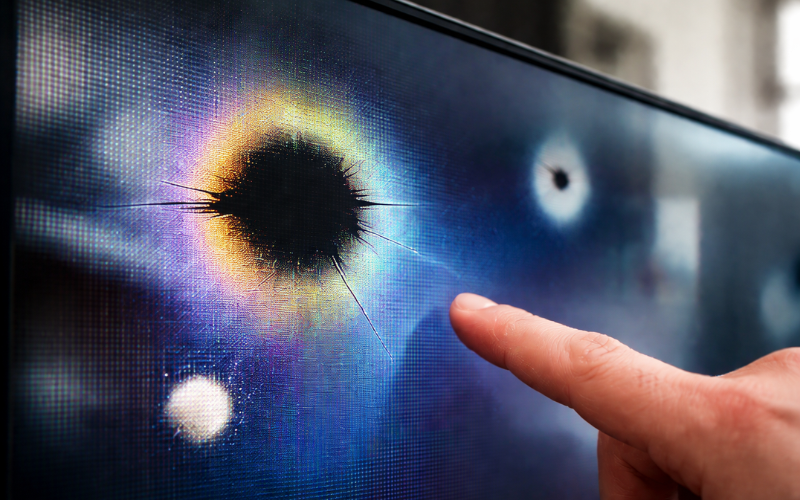
When you turn on your phone, laptop, or TV and notice an unusual dark or bright patch on the screen, it can be worrying. Many people search for answers when they see this issue for the first time, and that is where lcd spot damage often comes into the conversation. This type of screen problem is more common than you might think, and it can affect devices of all sizes and prices.
LCD spot damage refers to visible marks, patches, or spots that appear on an LCD screen and do not go away. These spots can distract from normal use, reduce display quality, and sometimes grow worse over time. Understanding what causes this damage and how it behaves can help you decide what to do next and how to avoid similar problems in the future.
Understanding What LCD Spot Damage Is
LCD spot damage is a physical problem inside the screen panel itself. Unlike software glitches or temporary display errors, these spots stay visible no matter what app you open or what image appears on the screen. They may show up as dark circles, cloudy patches, bright white areas, or discolored sections that look different from the rest of the display.
This damage happens within the layers of the LCD panel. An LCD screen is made of several thin layers that work together to show images. When one of these layers is disturbed, pressed, or damaged, the light passing through the screen becomes uneven. The result is a spot that looks different from the surrounding area.
Because lcd spot damage is physical, it cannot be fixed by restarting the device, updating software, or changing display settings. This is an important point that many users do not realize at first.
Common Causes of LCD Spot Damage
One of the most common causes of lcd spot damage is physical pressure. Pressing too hard on the screen, even without cracking the glass, can damage the internal panel. This often happens when a phone is kept in a tight pocket, a laptop is closed with something on the keyboard, or a screen is pressed during cleaning.
Impact is another major cause. Dropping a device or hitting it against a hard surface can damage the LCD layer without breaking the outer glass. In these cases, the screen may look fine at first, but spots can appear days or weeks later as the internal damage becomes more visible.
Heat can also play a role. Long exposure to high temperatures can affect the liquid crystals inside the display. Over time, this can lead to uneven areas that show up as spots. Manufacturing defects are less common, but they do occur. In such cases, spot damage may appear even when the device has been handled carefully.
Different Ways LCD Spot Damage Can Appear
LCD spot damage does not look the same in every situation. Some spots appear dark or black, making it seem like the screen is bruised. These dark areas often block light and are especially noticeable on white or bright backgrounds.
Other spots may appear bright or white. These are areas where light passes through too strongly, creating a glowing patch that stands out, especially in darker scenes. Color distortion is another form, where a spot shows strange colors that do not match the rest of the screen.
The size of these spots can vary. Some start as small dots and remain stable for years, while others slowly spread and become more noticeable. The way the damage appears often depends on how severe the original impact or pressure was.
How LCD Spot Damage Changes Over Time
In many cases, lcd spot damage does not stay exactly the same. A small spot might remain harmless for a long time, especially if the device is handled gently afterward. However, some spots gradually expand or change shape as the internal layers of the screen continue to weaken.
Temperature changes, daily use, and additional pressure can all make the damage worse. This is why a small mark that seems easy to ignore at first can become a larger problem later on. Early awareness helps users decide whether to repair the screen sooner rather than dealing with a bigger issue later.
Devices Commonly Affected by LCD Spot Damage
LCD spot damage can appear on almost any device that uses an LCD screen. Smartphones are especially vulnerable because they are handled frequently and often carried in pockets or bags. Tablets face similar risks, particularly when placed in backpacks without proper protection.
Laptops and computer monitors are also affected, usually due to pressure or impact. Closing a laptop lid on a small object or transporting a monitor without padding can easily damage the panel. Televisions, while less likely to be moved often, can still suffer from spot damage during installation, cleaning, or accidental bumps.
How to Identify LCD Spot Damage Correctly
Correctly identifying lcd spot damage is important before deciding on a solution. One simple way to check is to display a plain white, black, or solid-color background on the screen. If the spot remains visible across different colors and brightness levels, it is likely physical damage.
Another sign is that the spot does not change position. Software-related display issues usually shift or disappear when the screen content changes. LCD spot damage stays in the same place at all times.
If you connect your device to an external display and the spot does not appear there, this further confirms that the issue is with the screen itself and not the device’s graphics system.
Can LCD Spot Damage Be Repaired?
Whether lcd spot damage can be fixed depends on how serious it is. Minor pressure marks sometimes fade slightly over time, but this is not guaranteed. In most cases, true spot damage does not fully go away on its own.
For smartphones, tablets, and laptops, the most reliable solution is screen replacement. This involves replacing the entire LCD panel, which removes the damaged area completely. While this can restore the display to like-new condition, the cost may be high depending on the device.
For larger screens like TVs or monitors, repair is often more expensive than replacement. This is why many users choose to live with minor spot damage if it does not seriously affect viewing.
Preventing LCD Spot Damage in Everyday Use
Prevention is always easier than repair. Avoid applying pressure to screens, even during cleaning. Use a soft cloth and gentle movements instead of pressing hard. Protective cases and screen covers can help reduce the risk of damage, especially for mobile devices.
When carrying laptops or tablets, make sure they are stored in padded bags and avoid placing heavy items on top of them. Keep devices away from extreme heat, such as leaving them inside a hot car for long periods.
When LCD Spot Damage Becomes a Real Problem
Not all spot damage affects usability in the same way. A small spot near the edge of the screen may be barely noticeable during normal use. However, spots in the center of the display or those that interfere with text, images, or videos can quickly become frustrating.
For professionals who rely on accurate visuals, such as designers or video editors, even minor lcd spot damage can be unacceptable. In these cases, replacing the screen may be the best option despite the cost.
Conclusion
LCD spot damage is a common but often misunderstood screen issue. It appears as visible spots or patches that do not disappear and are caused by physical damage inside the LCD panel. While it may start small, it can sometimes grow worse over time, affecting how enjoyable and practical a device is to use.
By understanding what lcd spot damage looks like, what causes it, and how it develops, users can make informed decisions about repair, replacement, or prevention. Gentle handling, proper storage, and awareness are key to keeping screens in good condition. Even when spot damage does occur, knowing your options helps you choose the best path forward with confidence.
FAQs
1. What is LCD spot damage?
LCD spot damage refers to visible dark, bright, or discolored spots that appear on an LCD screen. These spots usually stay in the same place and can affect image clarity, making parts of the display look uneven or distorted.
2. What causes LCD spot damage on a screen?
LCD spot damage is commonly caused by pressure on the screen, liquid exposure, internal pixel failure, overheating, or manufacturing defects. Even slight impact or long-term pressure can damage the internal layers of the LCD panel.
3. Can LCD spot damage be fixed?
In most cases, LCD spot damage cannot be fully repaired because the damage occurs inside the display panel. Temporary solutions may reduce visibility, but permanent LCD spot damage usually requires replacing the screen.
4. Does LCD spot damage get worse over time?
Yes, LCD spot damage can worsen over time, especially if the screen continues to be exposed to pressure, heat, or moisture. Small spots may spread or become more noticeable with regular use.